Design Guidelines
At Guru Printers we’ve got a variety of templates you can choose from to create your business card. You can also upload your own designs as well. Here are some important guidelines to help you.
The following measurements are for standard business cards. Rounded corner or square cards, have similar bleed and safe printing areas in relation to their size. We can provide further assistance should you have any questions.
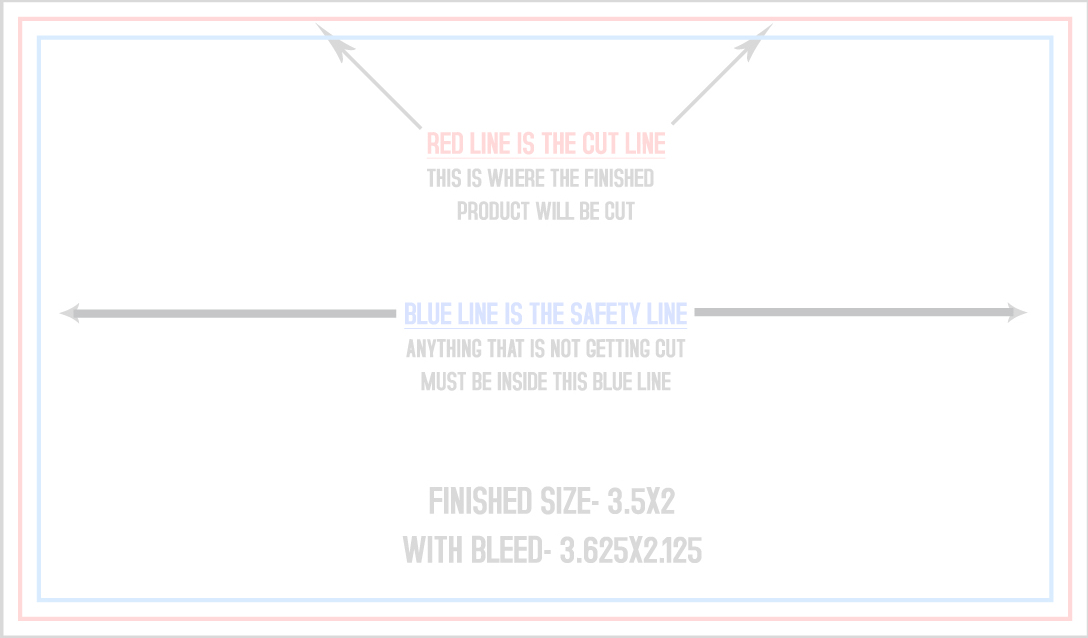
3.5″x2″ Business Card Template
Bleed Area: 3.61″x 2.11″
Make sure your background color or pattern extends a bit beyond the actual size of the card. This way even if your cards are cut a bit off center you won’t end up with white borders.
Actual Size: 3.5″x 2″
We make sure all your cards are uniform and centered throughout but be sure to read about the safe printing area. Actual size refers to the measurement of where we cut your cards.
Safe Printing Area: 3.36″x 1.86″
Put your text and design elements within this area. Remember to keep everything inside this box to ensure nothing gets cut off.
See upload guide below for a comprehensive list of our upload requirements and file types.
Standard Business Card Printing Specs
Bleed
91.7 x 53.6 mm
3.61 x 2.11 in
1083 x 633 px
Trim
88.9 x 50.8 mm
3.50 x 2.00 in
1050 x 600 px
Safe area
85.4 x 47.3 mm
3.36 x 1.86 in
1008 x 558 px
Rounded Corner Business Card Printing Specs
Bleed
91.7 x 53.6 mm
3.61 x 2.11 in
1083 x 633 px
Trim
88.9 x 50.8 mm
3.50 x 2.00 in
1050 x 600 px
Safe area
85.4 x 47.3 mm
3.36 x 1.86 in
1008 x 558 px
Square
Bleed
66.7 x 66.7 mm
2.63 x 2.63 in
788 x 788 px
Trim
63.7 x 63.7 mm
2.51 x 2.51 in
752 x 752 px
Safe area
60.7 x 60.7 mm
2.39 x 2.39 in
717 x 717 px

Leave a Reply