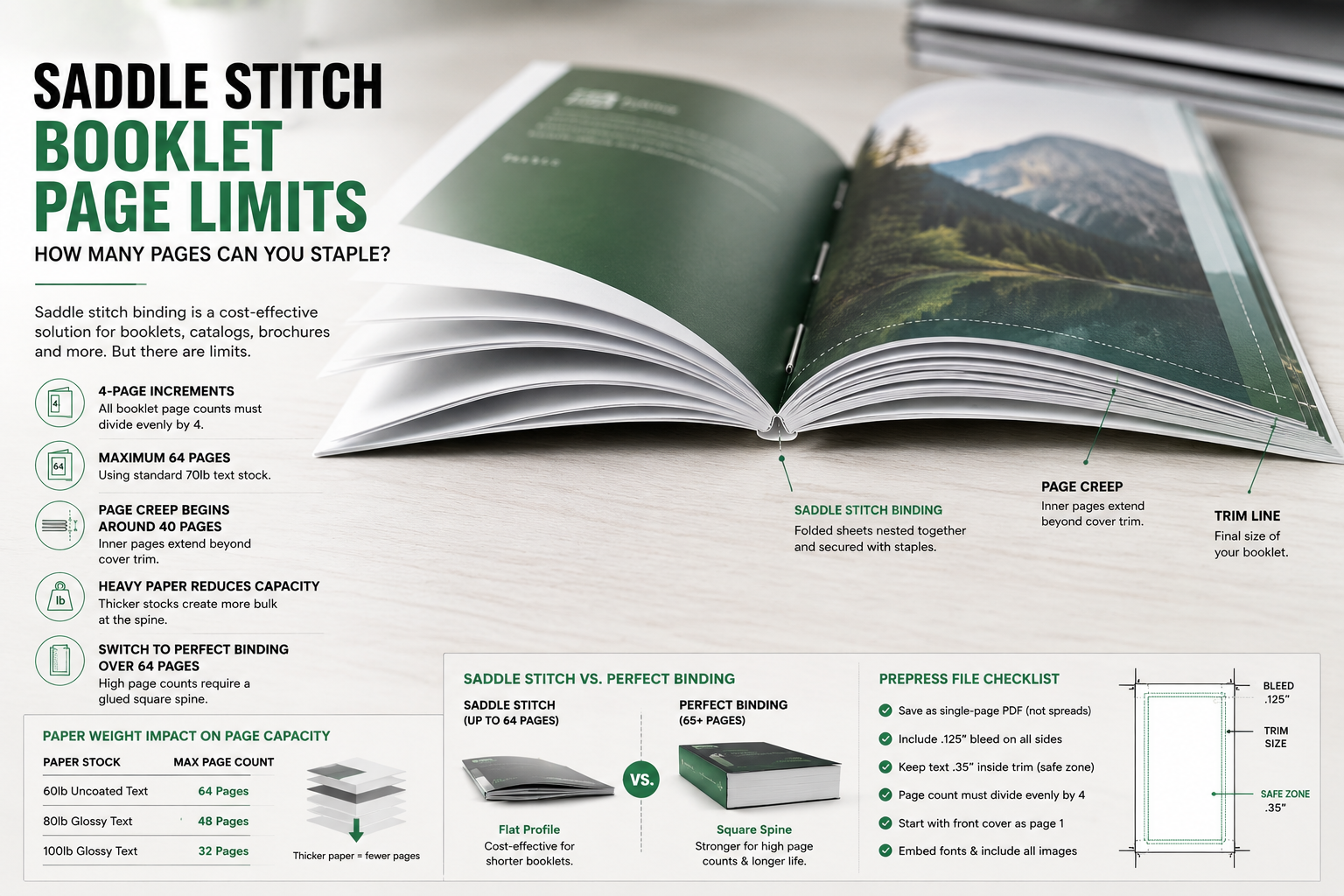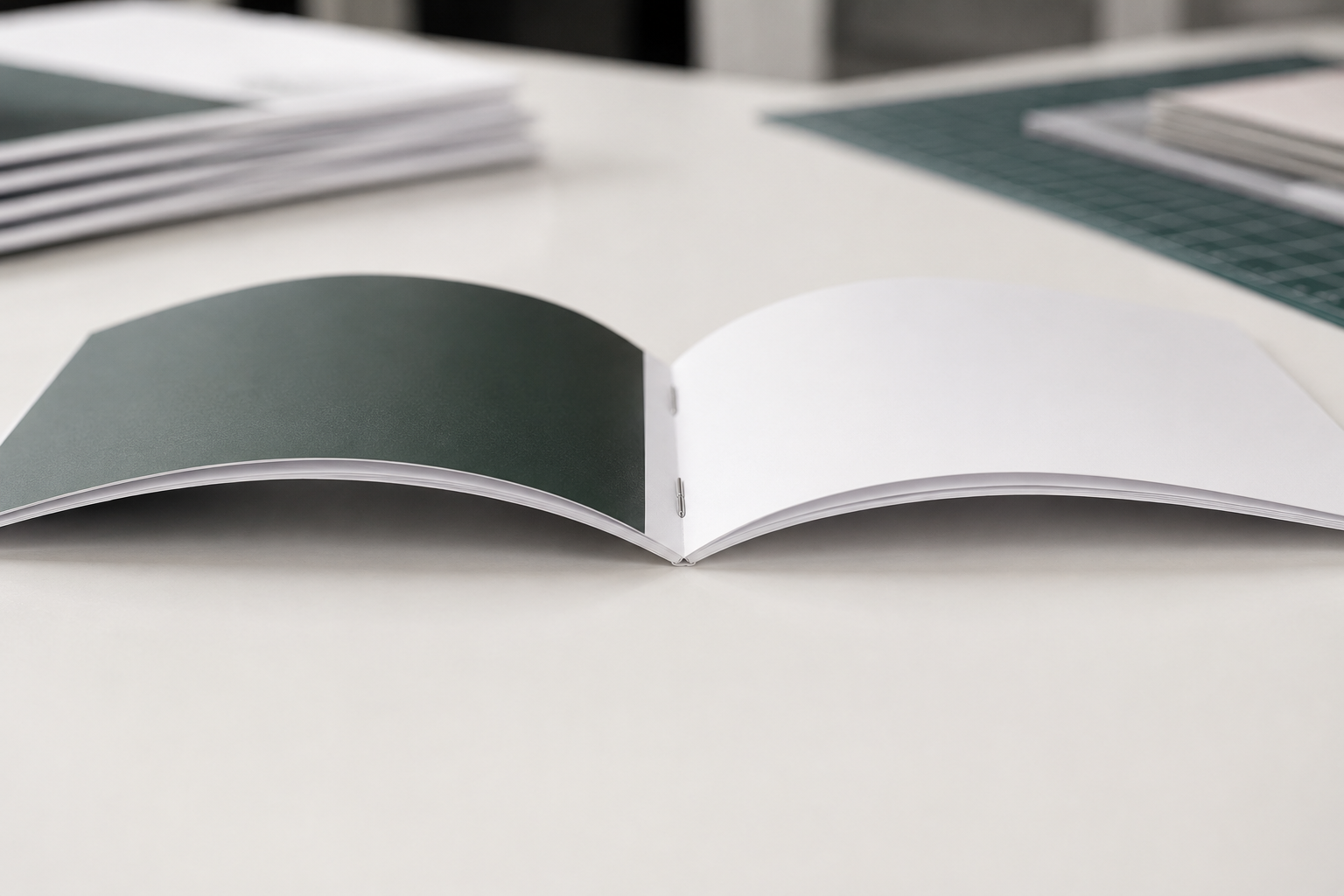
Calculating the mechanical limits of a center-stapled document requires separating total sheet count from page count. A standard booklet consists of printed sheets folded in half and nested together before staples secure the spine. This layout structure means every single piece of paper inside the binding creates 4 individual numbered pages.
The physical thickness of the chosen paper stock directly dictates the maximum saddle stitch booklet page count before the booklet faces production errors. Thick paper stocks reduce the total page capacity because heavy sheets create a curved spine that pushes the inner pages outward. This outward push requires heavy trimming that reduces the outer margin area of your final product.
Exact Page Demands for Perfect Binding
Maximum and Minimum Page Requirements for Stapled Documents
Saddle stitch booklet page count limitations depend entirely on text paper thickness and paper weight to avoid spine tearing. Standard production runs utilizing 70 pound uncoated text paper reach a maximum capacity of 64 pages. Exceeding 64 pages causes a structural defect known as page creep where inner sheets protrude past the cover lines.
| Category | Value | Notes |
| Minimum Page Limit | 4 pages | Requires exactly one single sheet of paper folded in half |
| Maximum Page Limit | 64 pages | Maximum capacity using standard 70 pound text stock |
| Page Increment Factor | 4 pages | Total booklet page counts must divide evenly by 4 |
| Creep Point Threshold | 40 pages | Prepress shingling software must shift inner text blocks |
If a digital layout document contains 38 pages, then the graphic designer must add 2 blank pages to reach a total count that divides evenly by 4. If the total page count reaches 80 pages, then the print buyer must choose perfect binding with a glued square spine instead of center staples.
Selecting Your Layout Size
Designing for Standard and Compact Page Layouts
Page dimensions alter how text blocks and margins distribute across a physical booklet layout. Large-format manuals use a standard letter size format to maximize printable areas for technical data sheets and multi column product catalogs. This large-scale layout prevents heavy paragraphs from crowding the center gutters near the stitch lines.
- Letter-size booklet specifications utilize 8.5 inch by 11 inch dimensions.
- Half-letter booklet configurations utilize 5.5 inch by 8.5 inch dimensions.
- Pocket guides require custom adjustments to protect small font lines from disappearing into folds.
If a project requires dense instructions with long paragraphs, then selecting the larger letter-size format ensures text readability. Designers can plan a multi-column catalog using the saddle stitch booklet page count to confirm margin safety zones before exporting print ready files.
Structural Integrity of Small Booklets
Controlling Paper Thickness and Creep in Compact Prints
Compact half-letter booklets require thin paper weights to prevent the final bound spine from bowing open. When total sheet counts increase in a tight format, the collective thickness at the center fold lines increases rapidly. This physical thickness forces the inner pages outward, which requires heavy automated trimming during final assembly.
| Paper Stock Option | Maximum Page Count | Structural Assembly Notes |
| 60lb Uncoated Text | 64 pages | Prevents bulky spines in high page count manuals |
| 80lb Glossy Text | 48 pages | Coated stock limits total page capacity to avoid bowing |
| 100lb Glossy Text | 32 pages | Thick premium paper requires a lower absolute sheet limit |
If your production layout uses thick 100 pound glossy text paper, then you must limit the saddle stitch booklet page count to 32 pages to prevent spine cracking. If you decrease the text paper weight to 60 pound stock, then the booklet remains flat and accommodates more pages.
Resolving Prepress Layout Errors
How to Prepare Digital Files for Center Staple Production
Automated prepress systems reject digital document files that arrive saved as reader spreads instead of single pages. A reader spread shows 2 side-by-side pages exactly as a human views the finished physical booklet. Industrial production machinery requires files saved as sequential single pages so the imposition software can reorder the plates.
More Suggestions:
- Save all final digital layout files as one single PDF containing individual sequential pages.
- Include a minimum bleed area of .125 inches on all four outer edges.
- Maintain a .35 inch safe zone inside the trim lines to protect outer text.
If a text block sits closer than .35 inches to the outer edge, then automated trimming knives will slice off parts of the letters. If you arrange the document files sequentially starting with the front cover as page one, then our imposition systems can arrange the plates accurately.
Calculating Total Production Costs
Understanding Base Rates and Paper Upgrades for Commercial Booklets
The total cost of commercial booklet printing depends on final sheet volume and machine processing times. Thin stapled booklets process through automated bindery lines at high operational speeds, which minimizes manual labor expenses. Heavy booklets require slower processing speeds and careful shingling software setup to correct page creep, which increases the initial prepress labor fees. If your total order volume exceeds 500 units, then the initial setup fees distribute evenly to lower the separate unit cost. If you select a self-cover format where the cover uses the exact same paper weight as the inner pages, then you eliminate separate printing press runs.
Contact us for exact pricing.
Binding Limitations and Alternative Methods
When to Abandon Center Staples for Flat Spine Options
High page counts eventually destroy the mechanical utility of a center-stapled document. When a booklet exceeds 64 pages on standard text stock, the spine loses its sharp fold line and becomes triangular. This triangular spine distortion prevents finished booklets from stacking flat, which complicates bulk packaging and box shipping.
Some additional pointers:
If booklet page count is under 64 pages ──► Choose center staples for a flat profile
If booklet page count is over 64 pages ──► Choose perfect binding for a square spine
When a commercial catalog design requires 80 pages, switching to perfect binding ensures a clean square spine. Reviewing the target saddle stitch booklet page count helps clarify where physical thickness limits force a transition to glue-based binding. If the document remains within 40 pages, then staples provide a cost-effective solution.
Paper Weights and Spine Flexibility
Choosing Texture and Coating to Avoid Spine Cracking
Coated glossy papers require precise mechanical scoring before folding to protect printed ink lines from fracturing. Heavy ink coverage along a center fold line alters the flexibility of the paper fibers, which causes visible white surface fractures if folded dry. Selecting the correct text stock weight ensures that the pages lie open naturally without resistance.
About Paper Stock:
- Matte-coated paper stocks offer high text readability under bright corporate office lights.
- Gloss text sheets increase color saturation for image-heavy lookbooks and look books.
- Uncoated text paper provides a porous tactile surface suitable for writing notes.
If your page layout features dark background colors across the center gutter, then ordering matte text paper stock reduces ink cracking. If you keep the total saddle stitch booklet page count under 48 pages on heavy paper, then the finished catalog retains excellent spine flexibility.
Final Assembly and Quality Inspection
Verifying Margin Safety and Secure Stitch Alignment
The final assembly phase utilizes automated high-speed mechanical trim blades to slice away uneven edges. The innermost sheet travels a further physical distance from the spine fold than the outer sheet, which results in a jagged edge before trimming occurs. Prepress shingling adjustments must push the text blocks of inner pages inward to guarantee uniform outer margins.
Our production team reviews your file layout to ensure every page maintains safe margins before printing begins. We control the printing process at our local Downtown Los Angeles and Arts District production facilities to ensure your binding remains durable.
FAQ
Can saddle stitch booklets include a thicker cover stock?
Yes. Many booklet projects use heavier cover paper with lighter interior pages to improve durability without increasing spine bulk too much.
Do saddle stitched booklets lay flat when opened?
Generally, yes. Saddle stitched booklets open flatter than perfect bound books, which makes them useful for manuals, catalogs, and event programs.
Can saddle stitch binding work for landscape layouts?
Yes. Landscape booklets are common for portfolios, menus, and presentation materials as long as the final page count still divides evenly by four.
What file format should I send for booklet printing?
Most commercial printers prefer a high-resolution PDF with embedded fonts, bleed settings, and sequential single pages instead of spreads.
To get started, contact Guru Printers at 213-612-4451 or submit your multi-page files through our online order pages to secure an exact production schedule.